One bad email or one fake payment request can shut down farm work and cost you real money. If I run a farm or poultry business, the basic fix is simple: lock down logins, train people, update devices, back up records, verify payment changes, and check insurance for cyber losses.
Here’s the whole article in plain English:
- Weak passwords and shared access make break-ins easier
- Phishing emails and fake invoices trick staff into clicking links or sending money
- Old software and outdated routers leave systems open to attack
- Missing backups can turn a small issue into days of downtime
- Payment fraud can drain cash flow through fake ACH or wire changes
- Insurance gaps can leave me paying for downtime, data loss, and recovery on my own
A few facts show why this matters:
- IBM’s Cost of a Data Breach report has often put the average breach cost in the millions of dollars
- Verizon’s breach reports have long shown that email scams and stolen login details are among the most common ways attackers get in
- MFA can block many account takeover attempts, which is why turning it on is one of the first steps I’d take
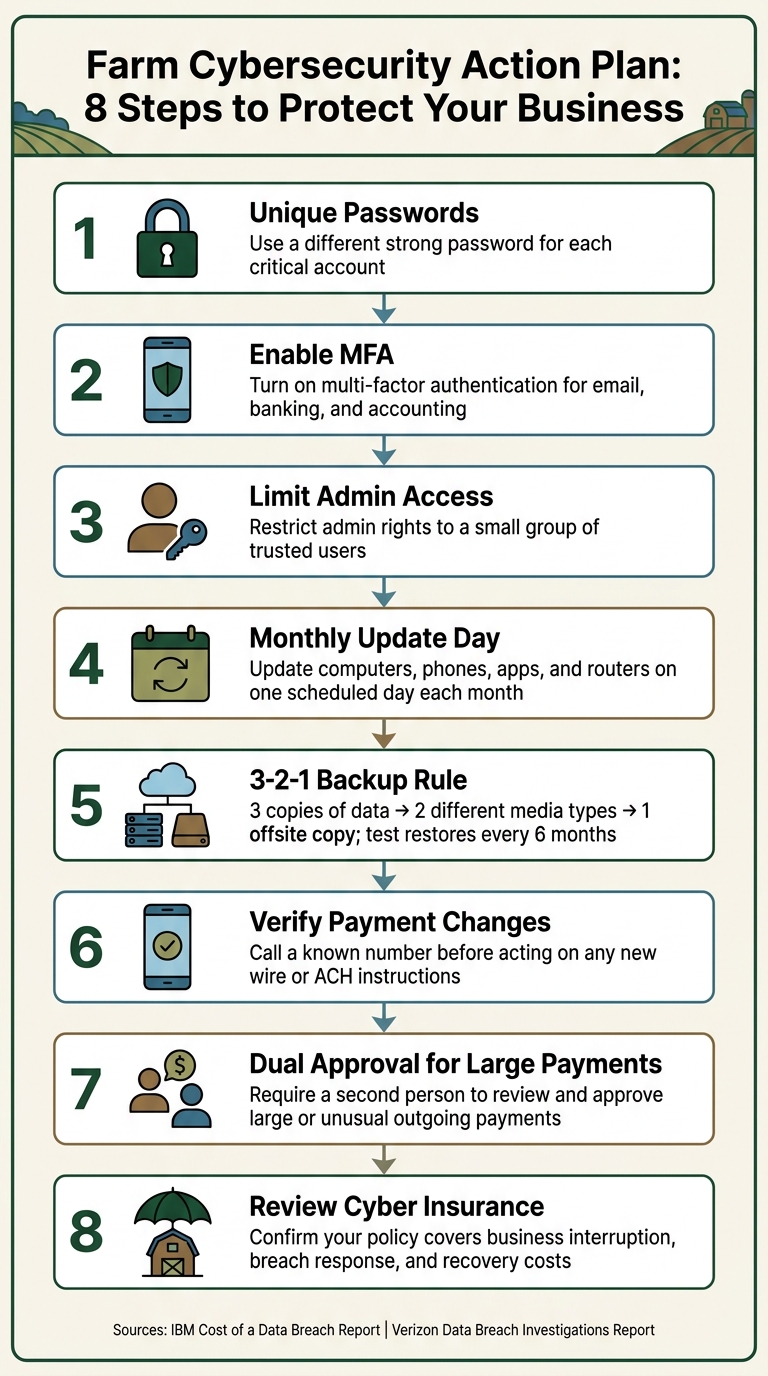
My short action plan would look like this:
- Use a different password for each main account
- Turn on MFA for email, banking, and accounting
- Limit admin access to only a few people
- Run a monthly update day for computers, phones, apps, and routers
- Follow the 3-2-1 backup rule and test restores every 6 months
- Call a known number before changing vendor banking details
- Use dual approval for large payments
- Review whether poultry or general farm insurance covers business interruption, breach response, and recovery costs
This is not about adding a lot of extra work. It’s about using a few clear habits to cut the odds of lost money, locked files, and stalled farm work.
Why Every Farm Needs a Cybersecurity Plan
sbb-itb-b725090
Problem 1: Weak Access Controls and Untrained Staff Make Attacks Easier
Farm account breaches often start in simple ways: a reused password, unsecured Wi-Fi, or one click on a suspicious link.
Use strong passwords, MFA, and limited account access
Start with the accounts and systems that matter most, including email, online banking, bookkeeping software, farm management apps, and your Wi-Fi router. Give each one its own complex password.
Turn on multi-factor authentication (MFA) for every critical account.
Keep administrator access limited to a small group of trusted users. Most employees and family members don’t need access to banking, payroll, or production settings.
Once access is locked down, patching and backups become the next line of defense. It is also a good time to review your farm liability risks to ensure your insurance coverage matches your current operations.
Train staff to spot fake invoices, urgent emails, and suspicious links
Phishing often goes after farm workers and family members with fake invoices, urgent payment requests, and suspicious links.
Train staff to slow down when something feels off. They should avoid clicking unexpected links, verify payment requests by calling a known number, and report suspicious messages right away.
Next, keep systems updated and backups ready so one breach doesn’t shut down operations.
Problem 2: Outdated Systems and Poor Backups Increase Downtime
Old software can leave your farm network wide open. When patches are missed, one infected device can spread trouble to production systems and financial records. For a farm or poultry operation, that can lead to missed contracts, lost production data, or days of downtime you just can't spare.
Set a monthly update routine for computers, phones, apps, and routers
Pick one day each month and make it your Cyber Update Day. Use that time to check for updates on computers, phones, apps, and your router. Turn on automatic updates whenever you can so critical patches don't get missed. Between update cycles, keep security software running.
Your router needs attention too. Change the default admin password, and use WPA3 if it's available. If not, use WPA2. Keeping router firmware current closes off another common weak spot in the network.
Back up financial records, production data, and contracts
The 3-2-1 backup rule is a solid place to start: keep three copies of your data, store them on two different types of media, and keep at least one copy offsite. For a farm or poultry operation, that includes tax files, flock or livestock records, inventory lists, and contracts.
Just having backups isn't enough. Test them. Run a test restore every six months to make sure your files can be recovered and aren't corrupted. Those backups may be the only thing standing between a small problem and a payroll, contract, or flock management mess.
Local backup vs. cloud backup for farm operations
Use both. A local external drive gives you fast recovery, while cloud backup gives you offsite protection.
Next, verify payments before money leaves the farm.
Problem 3: Payment Fraud Can Drain Farm Cash Flow
Even if your passwords are locked down and your devices are clean, one fake invoice can still send money out the door fast.
This kind of fraud usually starts with an email or text that looks like it came from a supplier, dealer, or contractor. The message says payment details changed, and before anyone spots the issue, the money lands in the wrong account.
That’s why any vendor message with new banking details should set off alarms. Don’t trust the message on its own. Before money moves, call a number you already know is correct and confirm the change. The same rule applies to recurring bills too. If payment instructions suddenly shift, pause and check.
For bigger payments, add one more layer: have a second person review and approve the payment inside your banking portal. It’s a simple step, but it can stop a bad transfer before it happens.
Verify Banking Changes and Large Payments
Call a known number to confirm any change to wire or ACH instructions before money moves. For larger payments, dual approval gives you a second set of eyes.
Use a Simple Payment Checklist and Bank Alerts
A short checklist can save a lot of trouble. Before paying, review:
- The invoice
- The account number
- The sender’s email address against your vendor records
- Any claim that the payment is urgent
That last one matters. Pressure to pay right now is a common fraud warning.
It also helps to set up transaction alerts through your bank. That way, you get a text or email right away any time a transfer goes over your chosen limit. For larger payments, add a second approval step.
Single Approval vs. Dual Approval for Outgoing Payments
Use single approval for small, routine bills. Require dual approval for feed, payroll, equipment, and any wire or ACH change.
Conclusion: Build a Simple Cyber Plan and Review Your Insurance Coverage
Give each task a clear owner: passwords, staff training, software updates, backups, and payment checks. If everyone owns it, no one owns it.
Next, write down the systems you can't operate without and set a recovery target for each one. That could include payroll, flock management, billing, email, accounting, or any other system that keeps the farm moving.
Then use those recovery targets to review your insurance. If a system goes down, will your policy help cover downtime, data loss, and recovery costs? That's the part many businesses skip.
Check Cyber Coverage in Your Farm Protection Plan
Cybersecurity steps can lower risk, but they don't stop every outage or fraud event. A bad payment transfer, locked files, or a system outage can still hit hard.
Ask whether your current policy covers cyber-related costs such as:
- Business interruption
- Data breach response
- Recovery expenses
Work with Martin Agency to Review Farm and Poultry Coverage
Martin Agency can help you review your farm and poultry coverage checklist for cyber-related gaps. Share your critical systems and recovery targets so Martin Agency can identify cyber-related gaps in your farm or poultry coverage.
FAQs
Which farm systems should I secure first?
Start with the systems that keep your operation up and running and are most likely to be hit by an outage: buildings and structures, climate-control and ventilation systems, feeding and watering equipment, and backup power.
Then move to the equipment you use every day and the inventory areas you can't afford to lose, like feed and medications. After that, tighten access and monitoring around high-risk spots such as chemical storage, barns, and grain bins.
How often should I test my backups?
Test your backups on a regular schedule as part of routine maintenance. How often you do that should match your farm’s workload, but steady checks help confirm your data is still there and can be restored when you need it.
Make backup verification a normal part of day-to-day operations so your key business records are better protected from data loss.
What should I do after a phishing click?
If you click a phishing link, move fast to protect your business and data.
First, disconnect the device from the internet or your company network. Then change passwords for any accounts used on that device, and contact your IT team or cybersecurity provider to check the device for malware or other infections.
After that, keep a close eye on your accounts for suspicious activity. You should also notify your insurance provider, such as Martin Agency, since cyber liability insurance may help cover data breach costs.